Use a branded subdomain for short links
Reserve a hostname such as yourbrand.lrc.sh and use it for the short links in your Send SMS steps.
A branded subdomain is a hostname for your short links on a domain VYG runs, such as yourbrand.lrc.sh. A link in a text looks like https://yourbrand.lrc.sh/s/A7mP4kR9xT2vN6qB. When a shopper opens it, they go to the original page.
This setup doesn't need a DNS change or a script on your website.
Before you start
- You need to be a brand administrator to save a hostname.
- You can also pick your first name from the message editor: tick Shorten links and use the name field that appears. It saves the name the same way as Settings > Links.
- Decide on a name before you save. A saved name stays reserved for your brand and can't be released in the app.
- Each brand can reserve up to 3 hostnames.
Reserve a hostname
Open Links settings
In the left menu, click Settings, then click Links. The hostname form is under Branded short links. Hostnames you have already reserved are listed above the form, each with its status.
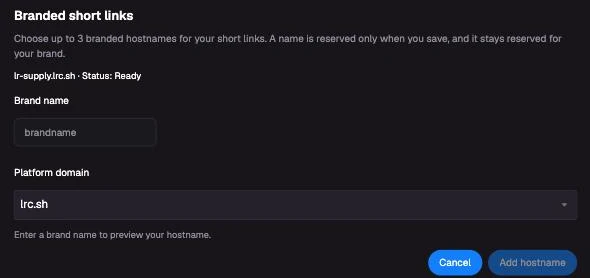
Enter a brand name
Under Brand name, enter the name for your hostname. Use 3 to 63 letters, numbers or hyphens, and start and end with a letter or number. Some common names, such as www, help and support, can't be used.
Choose the platform domain
Under Platform domain, select lrc.sh. The full hostname appears below the field.
Save the hostname
Click Save. If your brand already has a hostname, the button says Add hostname instead. When Status shows Ready, the hostname can be used in your campaigns.
If the name belongs to another brand, you see This hostname is already reserved. Choose another name.
Use the hostname in a campaign
Open the message
Open a campaign and click its Send SMS step, then click the message text to edit it. The message needs to contain a link or a link variable. Send an automated text explains how to add one.
Tick Shorten links
Tick Shorten links. The line below says Short links use followed by your hostname. If your brand has more than one hostname with the status Ready, pick one from the list. A new hostname can take up to 30 seconds to appear.
Save
Click Save under the message, then click Save at the top of the campaign.
Each Send SMS step has its own Shorten links box, so tick it on every step that should use the hostname. If your account has message variants, each variant has its own setting too.
Messages set up with the older link options
Messages saved before Shorten links may use the brand website or a custom page for their short links. They keep sending that way. The editor shows Shorten links ticked with a note about the older link. When you save the message while your brand has a hostname, it switches to the hostname. If your brand has no hostname, saving leaves the older link as it was.
Test the link
Open Send Test
In the campaign's left toolbar, hover over the play icon to open Send Test.
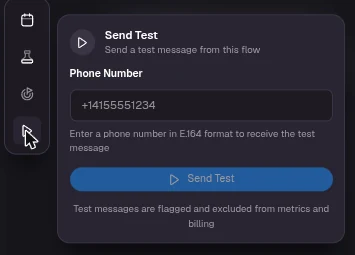
Send a text to your phone
Enter your phone number with its country code, such as +14155551234, and click Send Test.
Open the link
Check that the text shows your hostname, then tap the link. It should open the original page. A link variable, such as a cart link, opens your store's home page in a test because a test has no real cart.
Send Test sends one message from the campaign. In a campaign with several Send SMS steps, it may not be the step you edited, so test in a campaign with one step when you can. Test messages are flagged and excluded from metrics and billing. Each test creates a new short link.
Common questions
The fields in the Branded short links form are locked
Saving needs a brand administrator. If the form says Branded hostnames are not available to reserve yet, no platform domain is open. Contact service@vyg.ai.
My hostname isn't offered under Shorten links
Check that Status shows Ready under Branded short links in Settings > Links, then reopen the message after 30 seconds.
The test text has the full link instead of a short one
First check that Shorten links is ticked on the message being tested. If it's set to your hostname, the short link couldn't be created, so VYG sent the full URL, and the confirmation message says so. Try again, and contact service@vyg.ai if it keeps happening.
Can I have more than one hostname?
Yes, up to 3. In Settings > Links, enter another name under Branded short links and click Add hostname. Each name with the status Ready can be picked under Shorten links.
Which hostname do my links use?
Each Send SMS step uses the hostname shown under its Shorten links box. Adding a hostname doesn't change existing steps.
I've reached the limit, or I need a name removed
Names stay reserved for your brand and count toward your limit of 3. To remove one, contact service@vyg.ai. You can also ask there about using your own custom domain.
Status shows Pending DNS and TLS verification or Verification error
VYG manages this setup, so there is nothing to change on your side. Contact service@vyg.ai if the status doesn't change to Ready.